
We made mum an AI voice assistant
/ 11 min read
Table of Contents
Losing her sight
My mum is losing her central vision. Staying with her for a few days last year was a huge shock. Her central vision is almost gone. She kept laughing about my head disappearing as we talked!
We knew she was losing her vision, but the reality of seeing it first hand was frightening.
Existing technology
Mum has been really proactive in going to assistive technology sessions with Guide Dogs Australia. I assumed that her phone and voice assistant would be very useful for daily chores.
She tried to send a text message and got interrupted after a few words and the garbled message was sent. Same with email. Siri could launch Uber, but then she was asked to press buttons.
The assistive settings required a sighted person to enable, so she could not turn them on and off as required. Even for a sighted person these settings were hard to find and understand. The screen reader was far too complicated to use.
And it went on and on. Even though modern phones have voice assistants, you can tell they have been designed for fully sighted people.
My siblings and I all work in technology. So we decided to see if building a voice assistant for mum would help. It didn’t really. This is our experience and what we learnt from it.
The process
In classic software engineering fashion I jumped into building way too quickly. My brother said why don’t we actually talk to mum to see what she wants? Brilliant idea. That was the first lesson, every time we talked to mum we learnt something surprising about what she needed and wanted.
We learnt that she wants to record things as she thinks about them, organisation is really important, she needs to be able to share her shopping list with her carer, doctors give taxi vouchers but she and friends have had bad taxi experiences and more.
There was complexity with different needs, particular ways she liked to do things and the support structures she has.
My sister started researching existing apps, just to make sure we were not building something that already existed. She tested different note keeping apps and all required vision, complicated set up or didn’t fit with what she needed. It all confirmed what we had found, voice assistance is not always assistive.
My other sister built a list of scenarios. Scripts of what mum would say to the voice assistant and how it would respond. And mapping those interactions back to the things that mum needed.
The app
So we built her a voice assistant. We called it Helpen, which is Dutch for “to help”.
It was never a product. There was no business plan and no other users. It was a thing just for mum. That made a lot of decisions easy: hard-code what suits her, use shared API keys, deploy outside the App Store. Building for one person is much, much easier than making a product for many.
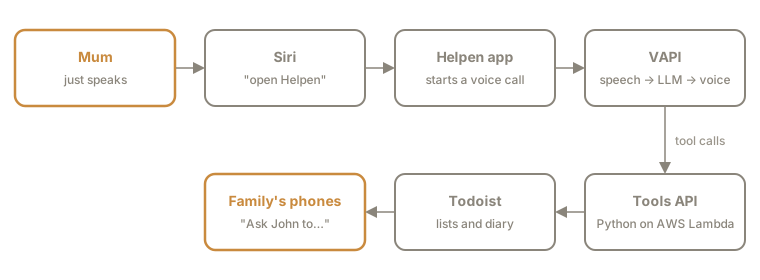
The app is a small React Native and Expo app. When it opens, it starts a voice call straight away. There’s almost no screen, just a few audio tones.
Expo worked very well for me, it saved a lot of certificate handling pain, it made deployment for both iOS and Android super easy. But then I lost all the time again trying to get my sister set up with the same flow, errors I could just not fix.
My brother found and suggested VAPI for the voice side of things. It’s effectively a voice API with an LLM in the cloud. Again, very easy to use and prototype, perfect for this type of project.
The backend lived in AWS Lambda. It started as an MCP server. This should have been painless, but as I’ve found in other projects, it breaks in weird ways. Getting VAPI and MCP to work together was painful. I switched to plain REST endpoints, which required more setup in VAPI, but it worked.
I kept the MCP so I could test locally. My sister’s scenarios came in handy here. They became integration tests that I could run with a local Ollama server.
There’s no database. The backend is Todoist. The key advantage is that it handled notifications. All the siblings could see the notes and tasks (with mum’s permission).
For example, assigning a task to someone sends them a notification. So when mum says “ask John to fix the gate”, I get a ping on my phone.
Testing
My sister ran through app changes with mum, with often hilarious results. What seems straightforward and obvious to a developer often isn’t to everyone else. Every developer knows the feeling of watching someone use something you’ve made, wanting to jump in and explain and help. But realising that you’ve not thought things through.
It was invaluable to have my sister make notes about things that worked well, when mum got confused, when there was a misunderstanding.
Design
When I first made the app I just had a single big red button that hung up the call, the call started automatically when the app started. In my mind that was all that was required.
My other sister went deeper. Low vision does not mean no vision. She made a design that included ebbing lights with different hues. Movement and colour are two things that are still available when central vision is gone.
She added audio feedback:
- A processing tone plays while Helpen fetches data, so silence doesn’t feel like the call dropped.
- A separate error tone is followed by a suggested correction, so she doesn’t have to start again.
- A closure chime plus “All done” tells her she can put the phone down. Knowing when a conversation has ended is its own problem without a screen.
- All sounds were chosen to be distinct from household noise, so nothing sounds like the microwave, doorbell or TV.
Her point was that multi-modal feedback is more comforting and human. We’re so focused on parsing symbols; we forget about the other senses, and other ways of conveying information.
She wanted to dive deeper into the idea that all needs are individual. AI should be able to adapt. Generative UI isn’t just visual. It can also shape the voice, the audio and the app’s features. It should be able to create responses we haven’t planned for.
What we learnt
This is what we learnt building a voice assistant for our mum. It is not universal advice. I am not an expert in this at all!
Voice is reactive not proactive
We had locked in on mum writing notes, but far more often mum wants to read those notes at a glance.
A paper diary sits on the bench and reminds you of things just by being there. A voice assistant does nothing until you speak to it. It’s driven entirely by requests.
Part of the testing feedback was that mum said her tasks were “hard to remember they are there”. Out of sight, out of mind, literally.
We made a change to start a conversation with reminders of outstanding tasks and upcoming events.
Paper calendars have spatial awareness
My sister pointed out something I hadn’t thought of. On a paper calendar you can see that something is two weeks away. You lose that when you can’t see the page. “The twentieth” is just a date.
So the assistant should say “in two weeks” or “next Thursday”. Mum also wanted to know if she was double-booking a day, which is obvious on paper and invisible in voice.
Feedback is important
Because of the lack of spatial awareness and at a glance summaries, we made sure the voice assistant summarised changes after they were made and asked for confirmation before doing anything.
The assistant reads back anything important before acting on it: appointments, messages to family, anything being deleted. After a change, it says the new state: “You now have four things for John.”
Words matter
My sister noted the assistant used different wording each time. A “task”, “note”, “job”, all meaning much the same thing. Variation became confusion.
Our dog trainer told us not to use similar sounding words for commands. Dogs confuse “go” and “no”. Voice apps are the same.
We wanted Siri to open the app but “Helpen” and “health” sound similar. Mum was often in the Health app instead of the Helpen app. We need to be very careful about key words and phrases.
Tone matters too. We designed with functionality in mind, “Assign John a task”. But that’s not how mum talks. She likes to say “Send John a message to …”. It’s kinder.
We had to design for how mum talks about things, not how a software developer thinks about requirements and jobs.
Speed
Timing of the conversation was really hard. We didn’t want mum to be interrupted, but a few seconds of silence can make it seem like nothing is happening and the conversation painfully slow.
Replies are short. We used phrases like “got it” to give quick feedback. It uses her name, but sparingly.
An assistant that sounds human gets treated like a human, with all the expectations that come with that.
Assistants are multi-purpose
We thought of this as an app with a purpose. Mum would open it and make some notes. In testing we found mum treated it as a multi-purpose assistant. Saying “tell me a story” or “what’s the weather like today?”.
Because the assistant talks and responds in a human-like way, it’s natural to assume it is a multi-purpose assistant. It’s a different mental model to what we had.
LLM guardrails
In testing my sister found Helpen would make promises to do things it couldn’t actually do. Like with all LLMs, having guardrails is important.
Our approach in Helpen was careful prompt construction. After my experience using AI to write software, I would add an explicit checking agent. One LLM generates text, another assesses it for truthfulness. Generation is quite different from assessment.
Finally, an assistant can only do what it can connect to.
Integration limits
For an assistant to do something, there have to be integrations. Zapier worked, but the Google connection would sometimes expire and need reconnecting, which meant someone sighted had to step in. Getting access to GSuite, SMS, online shopping, Uber, etc all require some sort of authorisation which can be tricky if there is not a clean API with API keys. This was a hard limit on what we could do.
A plea to Coles and Woolworths: online shopping sites do everything they can to stop people automating online shopping, and I couldn’t find a reliable way to make it work. I understand they are trying to stop scrapers. But please, please open an API so people like me can enable online shopping for vision-impaired people.
The final result
We worked together as a family. We made a cool voice assistant with an Australian accent that mum could chat to. It could handle her tasks, schedule things, remind her of upcoming events. There were multiple rounds of testing, chats with mum. The scenarios we laid out all worked. Everything was good.
She was surprised it could do everything she needed. She said the voice was “very friendly and nice and makes you feel at ease”, and she liked that it said her name.
When I next was visiting I asked mum how it was going. She said after her cataract surgery her vision had improved a bit. She was still able to write notes and that is what works the best. It’s tactile, spatial, easy. Nothing beats a pen and paper.
There was a combination of caring for your mum, helping in a way you know how. And also building things because you enjoy it. And also rushing in with a high-tech solution when a low tech solution works better.
Pen and paper work for now, but probably not for long. We’ll continue to look at existing solutions and also whether Helpen will be useful once pen and paper isn’t an option. I’m hoping by then vision assistive technology will have come a long way and people with low vision can do everything on a phone that a sighted person can.